Keldyn GRC Agent
Every change, checked before it merges.
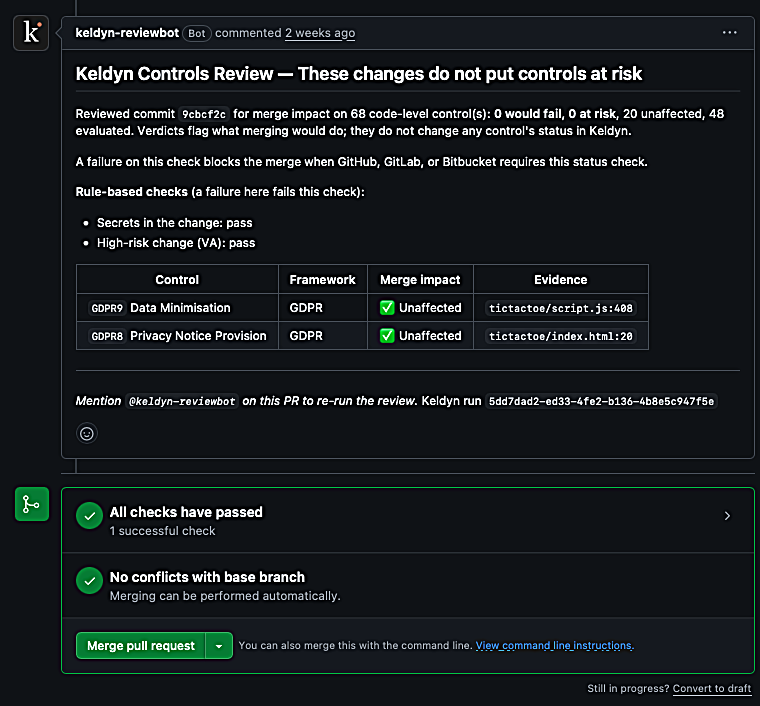
Keldyn GRC Agent asks one question of every change: would merging this make a requirement fail? The answer arrives where your team works, down to the file and line. On pull requests in GitHub, GitLab and Bitbucket, and on worktree and direct merges through Keldyn MCP.
kKeldyn GRC Agentcommented on PR #482
1 would fail1 at risk12 unaffected3 not applicable
GDPR right to erasureWould fail
api/routes/account.ts:42Access loggingAt risk
services/auth/login.ts:118Encryption at restUnaffected
Paste into your coding agentRestore the delete-account endpoint in api/routes/account.ts so users can still erase their data.
How it works
One change, start to merge.
Shown here on a pull request. Worktree and direct merges get the same check through Keldyn MCP.
Works with
GitHub, GitLab and Bitbucket
Runs when
A pull request is opened, updated, reopened or marked ready, or someone mentions
@keldyn-reviewbotYou get
Inline comments with a suggested fix, one summary table, and one line to paste into your coding agent.
Every route to main
Works however you merge.
Agentic teams merge code three ways. Keldyn GRC Agent checks each one before it lands, against the same controls, and records the same evidence.
How code gets merged
Keldyn checks it
Where it lands
1 · Pull request
2 · Worktree merge
3 · Direct merge
Keldyn GRC Agent on the PR
Keldyn GRC Agent via MCP
Keldyn GRC Agent via MCP
Main branch
1 · Pull request
Keldyn GRC Agent on the PR
2 · Worktree merge
Keldyn GRC Agent via MCP
3 · Direct merge
Keldyn GRC Agent via MCP
Main branch

Clear verdicts
Four answers. No noise.
Would fail
Merging this change would make the requirement fail, with the file and line. This fails the check.
At risk
Worth a look, but not a failure.
Unaffected
The change does not touch this requirement.
Not applicable
The requirement does not apply to this repository.
Also fails on secrets or high-risk code, such as eval or disabled TLS checks. It only blocks a merge if you make it a required check.